Docker and Linux Namespaces: A Complete Guide to Containerization
Containerization has transformed how we develop and ship applications. This article explores Docker and the fundamental mechanisms that make container isolation possible: Linux namespaces and cgroups.
What Is Docker?
Docker is an open-source platform that simplifies the development, distribution, and execution of applications through containers. A container is an abstraction that packages an application together with all its dependencies into an isolated, portable environment — eliminating compatibility issues caused by differences between host system configurations.
Key Characteristics
Isolation and Portability: Each container holds everything needed to run the application, guaranteeing that software behaves identically on any infrastructure.
Efficiency and Lightness: Containers consume fewer resources than traditional virtual machines by sharing the host kernel.
Operational Consistency: The container becomes the fundamental unit of the application lifecycle, reducing the time between writing code and putting it into production.
Main Use Cases
1. Rapid and Consistent Application Delivery
Docker eliminates the “works on my machine” problem through:
- Isolated development environments: Every developer works in a standardized environment
- Uniform testing: Containers are identical in every environment, ensuring reliable tests
- Rapid updates: Changes can be immediately tested and distributed
2. Flexible Deployment and Scaling
Docker’s flexibility shows up as:
- Total portability: Containers run on any infrastructure (laptops, physical servers, VMs, cloud, hybrid environments)
- Dynamic scaling: Instances can be started or stopped in real time to respond to load changes
3. Maximizing Hardware Resources
Container efficiency enables:
- Higher density: Many containers can run on the same server
- Cost reduction: More efficient hardware use translates to lower infrastructure costs
Docker Architecture
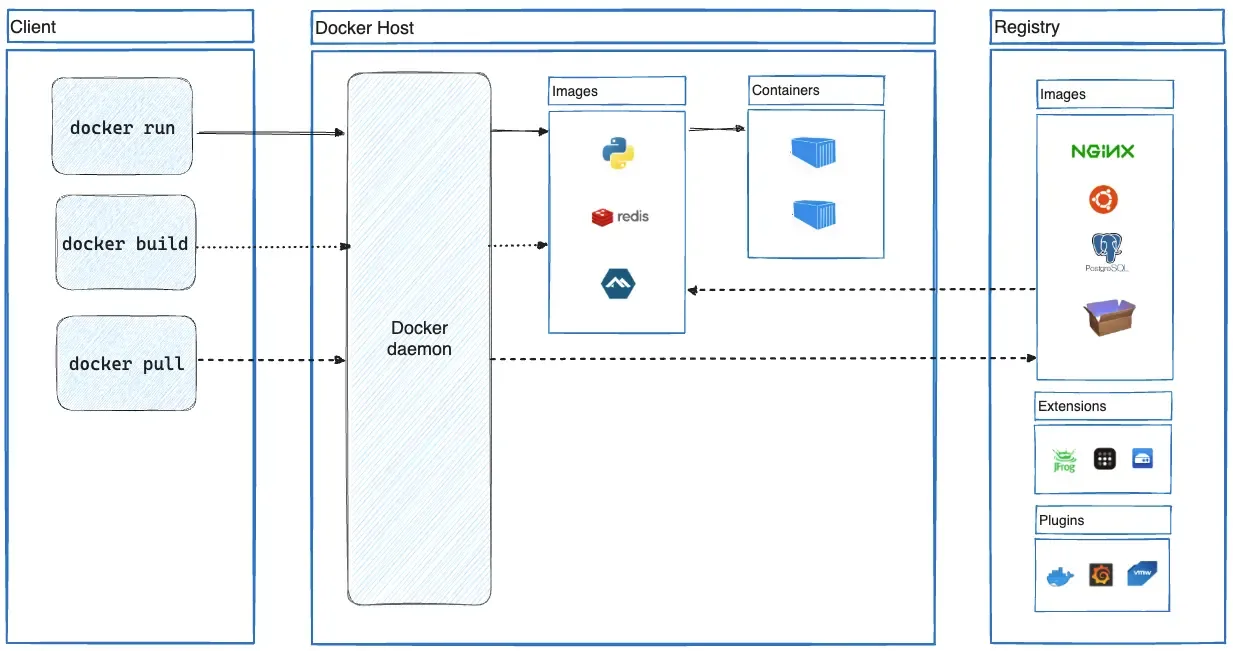
Docker’s main component architecture
Docker’s architecture is built on three main components:
Docker Client
The primary interface for interacting with Docker. The docker command sends requests to the Docker daemon and can communicate with multiple daemons simultaneously.
Docker Host
The system running the Docker daemon (dockerd), responsible for:
- Listening to API requests
- Managing Docker objects (images, containers, networks, volumes)
- Coordinating distributed services
Docker Registry
The storage and distribution system for Docker images. Docker Hub is the default public registry, but private registries can be configured.
Container Execution Flow
When you run docker run, Docker performs these steps:
- Image resolution: Checks local availability, otherwise pulls from the registry
- Container creation: Instantiates a new container based on the specified image
- Filesystem setup: Adds a writable layer on top of the read-only image
- Networking setup: Configures the network interface and IP addressing
- Process start: Executes the specified command as the main process
Docker vs Virtual Machines
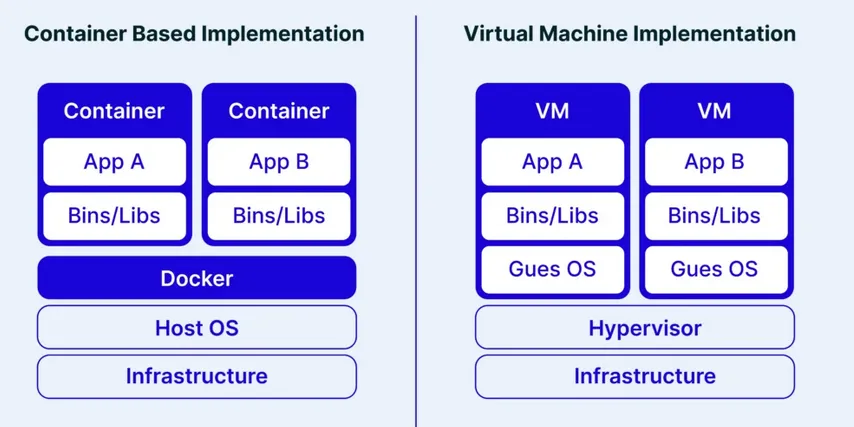
Comparison of the stack used by Docker and by virtualization systems
The fundamental difference between containerization and virtualization lies in the architecture:
Virtualization: Creates complete virtual machines with their own operating system via a hypervisor. Provides strict isolation but with high overhead.
Containerization: Containers share the host kernel, isolating themselves through namespaces and cgroups. This dramatically reduces overhead but offers less robust isolation.
This architectural choice represents a trade-off between complete security/isolation and agility/efficiency.
Linux Namespaces: The Core of Isolation
Namespaces are a Linux kernel mechanism that creates isolated environments for processes and resources. Each process can have a limited view of the system, accessing only the resources assigned to it.
Namespace Types
Linux supports eight types of namespaces:
- Mount (mnt): Isolates filesystem mount points
- Process ID (pid): Separates process IDs
- Network (net): Isolates network resources
- Interprocess Communication (ipc): Separates IPC resources
- UTS (uts): Allows setting different hostname and domain name
- User (user): Provides separation between user and group IDs
- Cgroup (cgroup): Isolates visibility of control groups
- Time (time): Allows separation of system clocks
PID Namespace
PID namespaces isolate processes by assigning them identifiers that are distinct from those in other namespaces. By default, a Linux system runs all processes within a single PID namespace, making them mutually visible. It is possible to create nested PID namespaces, yielding groups of processes isolated from the rest of the system.
This characteristic is crucial in container management, where each instance can have its own init process with PID 1 without interfering with other containers or the host.
Unlike other namespaces, PID namespaces are hierarchical: each namespace has a parent, and processes within it are visible from parent namespaces. A mapping system allows a process to have different PIDs depending on which namespace is observing it. This visibility also allows syscalls to be made on a process using the PID valid in the caller’s namespace.
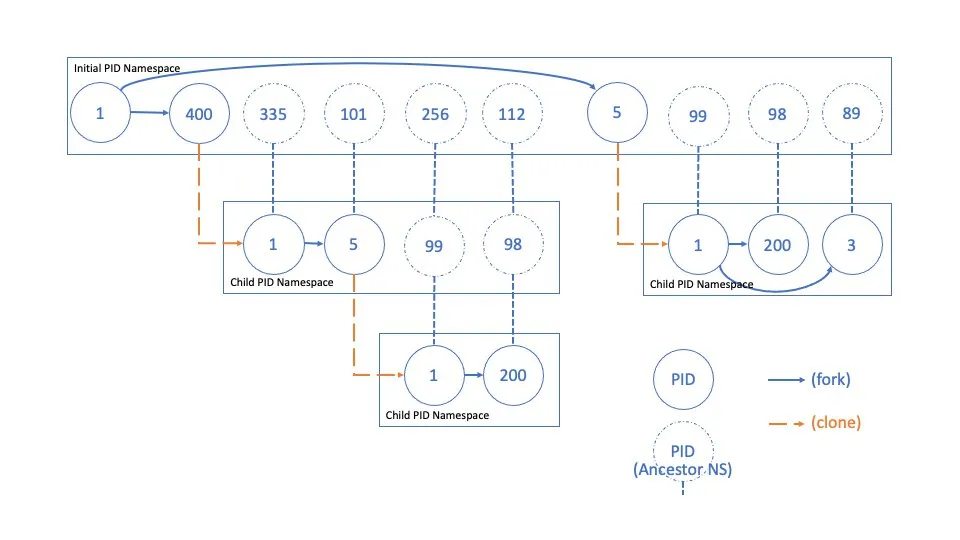
Representation of the process hierarchy within a PID namespace
Network Namespace
Isolating network resources — such as IP addresses, routing tables, and files like /proc/net — allows each network namespace to have its own independent network stack. This means every process within the namespace operates in an isolated subnet with no way to communicate with the rest of the system unless explicitly configured.
This isolation is an essential security mechanism: it prevents a compromised process from directly accessing the host network or intercepting unauthorized traffic. Any attack or compromise remains confined within the network namespace.
In Docker, this namespace type is used to map host ports to container-internal ports, allowing internal services to be reachable from the outside in a controlled manner. This means only the necessary services are exposed, improving security and connection management.
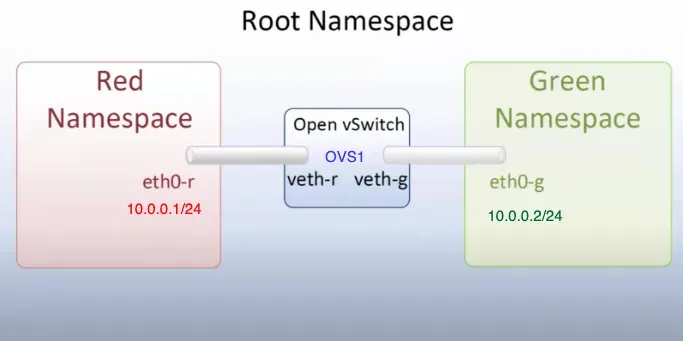
Example of communication via network namespaces
It is also possible to create virtual networks shared among a restricted group of processes, allowing them to communicate with each other without being exposed externally. Networks can also be configured to allow communication between different namespaces, facilitating interaction between isolated containers or processes while maintaining a high level of security and modularity.
CGroups: Resource Control
Cgroups (control groups) are a Linux kernel feature that allows limiting, monitoring, and isolating system resource usage — such as CPU, memory, disk I/O, and network — across groups of processes.
Through cgroups, quotas and priorities can be defined, preventing a single process from monopolizing system resources and ensuring better isolation between applications.
Cgroups are managed through a filesystem interface, typically mounted under /sys/fs/cgroup/. Each cgroup hierarchy corresponds to a directory, with subdirectories representing the different control groups. Within these directories, special files allow configuring limits and obtaining statistics on resources consumed by the processes in the group. For example, writing a value to the memory.max file sets a maximum memory limit for the group’s processes.
This technology is widely used in containerized environments to ensure efficient resource usage and improve isolation between containers.
At a conceptual level, the following resource categories can be managed:
- Memory: track memory consumption (e.g. maximum limits, swap availability). Limits can be soft — memory is reclaimed as needed — or hard, where exceeding the limit triggers the OOM Killer.
- CPU: track CPU consumption. Limits can be set that, when exceeded, throttle the CPUs running the offending processes.
- Blkio: track I/O operations. Excessive reads/writes trigger throttling.
- Network: limit network traffic.
- Device: restrict which devices a process can write to.
Practical Demos
Demo 1: Exploring PID Namespaces
This demo illustrates how containers are isolated processes on the host:
# 1. Start an Ubuntu container with an interactive shell
docker run -it --name pid-demo ubuntu bash

# 2. In the container, start a distinctive process
# (from the container shell)
watch -n 1 'ps aux | head -10'

# 3. From another shell on the host, identify the process
ps aux | grep watch

# 4. Analyze the process hierarchy
CONTAINER_PID=$(docker inspect --format '{{.State.Pid}}' pid-demo)
pstree -p $CONTAINER_PID

# 5. Verify namespace mapping
ls -la /proc/$CONTAINER_PID/ns/
grep -E 'NSpid|NStgid' /proc/$CONTAINER_PID/status

# 6. Kill the process from the host (demonstrates they are the same process)
kill $CONTAINER_PID
# The container will stop
Demo 2: Network Namespace and Port Mapping
This demo shows how network isolation works:
# 1. Start a container with port mapping
docker run -d -p 8080:80 --name web-demo nginx

# 2. Verify port mapping
docker port web-demo
ss -tlnp | grep :8080

# 3. Get the container PID
CONTAINER_PID=$(docker inspect --format '{{.State.Pid}}' web-demo)

# 4. Compare network namespaces
ls -l /proc/1/ns/net      # Host namespace
ls -l /proc/$CONTAINER_PID/ns/net  # Container namespace

# 5. Test connectivity
curl localhost:80         # Fails - port not exposed on the host
curl localhost:8080       # Works - mapped port

# 6. Enter the container's namespace
nsenter --target $CONTAINER_PID --net --mount --pid bash
# Now we are "inside" the container
curl localhost:80         # Works - we are in the container's namespace
Demo 3: CGroups and Resource Limiting
This demo shows resource control via cgroups:
# 1. Create a container with memory limits
docker run -it --memory=100m --name memory-demo ubuntu bash

# 2. Find the container's cgroup
CONTAINER_ID=$(docker inspect --format '{{.Id}}' memory-demo)
cat /sys/fs/cgroup/memory/docker/$CONTAINER_ID/memory.limit_in_bytes

# 3. Normal memory allocation test (from the container shell)
python3 -c "
data = []
for i in range(50):
    data.append(b'0' * (1024 * 1024))  # 1MB per iteration
    print(f'Allocated {i+1} MB')
"

# 4. Test exceeding the limit (should fail)
python3 -c "
data = []
for i in range(150):
    data.append(b'0' * (1024 * 1024))  # Attempts to allocate 150MB
    print(f'Allocated {i+1} MB')
"
# The process will be killed by the kernel OOM killer

# 5. Check system logs
dmesg | tail -n 20 | grep -i "killed process"
Demo 4: Real-time Resource Monitoring
# 1. Start a container with stress testing
docker run -d --name stress-demo --memory=200m --cpus=0.5 ubuntu \
  bash -c "apt update && apt install -y stress && stress --cpu 2 --memory 1 --memory-bytes 150M"

# 2. Monitor resource usage
docker stats stress-demo

# 3. Inspect cgroup files directly
CONTAINER_ID=$(docker inspect --format '{{.Id}}' stress-demo)
watch -n 1 "cat /sys/fs/cgroup/memory/docker/$CONTAINER_ID/memory.usage_in_bytes"

# 4. Analyze CPU statistics
cat /sys/fs/cgroup/cpu/docker/$CONTAINER_ID/cpu.stat
Conclusions
Docker represents a transformation in application deployment, combining efficiency, portability, and ease of use. Understanding the underlying mechanisms — namespaces and cgroups — is fundamental for getting the most out of this technology.
Namespaces provide the isolation needed to make each container believe it is the only one on the system, while cgroups ensure that resources are distributed fairly and in a controlled manner.
This combination makes Docker ideal for cloud-native environments, microservices, and CI/CD pipelines, where agility and efficiency are core requirements.