Start a container, take the PID Docker gives you, and run kill from the host.
CONTAINER_PID=$(docker inspect --format '{{.State.Pid}}' pid-demo)
kill $CONTAINER_PID
# the container stops
You did not power off a machine. You terminated a process — an ordinary one, listed in the host’s ps aux alongside everything else, with a parent, treated by the kernel like any other.
That is the thing worth holding on to when reasoning about what a container guarantees and what it does not: there is no isolated machine underneath. There are two Linux kernel mechanisms limiting what that process sees and what it can take. They are called namespaces and cgroups, and knowing where each one ends is the difference between using Docker and trusting Docker.
The container is a host process
The fastest way to convince yourself is to watch it.
# 1. Start an Ubuntu container with an interactive shell
docker run -it --name pid-demo ubuntu bash

# 2. In the container, start a distinctive process
# (from the container shell)
watch -n 1 'ps aux | head -10'

# 3. From another shell on the host, find the process
ps aux | grep watch

# 4. Inspect the process hierarchy
CONTAINER_PID=$(docker inspect --format '{{.State.Pid}}' pid-demo)
pstree -p $CONTAINER_PID

# 5. Check the namespace mapping
ls -la /proc/$CONTAINER_PID/ns/
grep -E 'NSpid|NStgid' /proc/$CONTAINER_PID/status

# 6. Kill the process from the host (proving it is the same process)
kill $CONTAINER_PID
# the container will stop
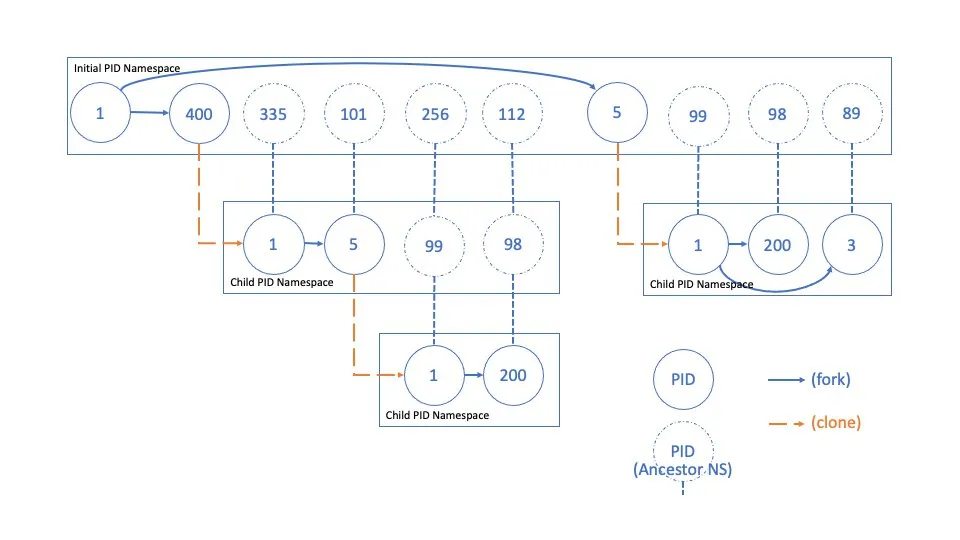
Step 5 is the one that explains everything else. /proc/$PID/status shows two PIDs for the same process: the one valid inside the container’s namespace — usually 1, because in there it is the init process — and the one valid on the host. One process, two identities, depending on who is looking.
PID namespaces are organised hierarchically: each namespace has a parent, and the processes inside it stay visible from the levels above. Isolation only works one way. From the host you see into the container; from the container you do not see out.
Namespaces: what that process gets to see
A namespace limits the slice of the system a process perceives. Linux has eight kinds — mount, PID, network, IPC, UTS, user, cgroup, time — and Docker uses nearly all of them together, but two deserve attention because that is where expectations go wrong most often.
PID, just seen: every container has its own process with PID 1, which interferes neither with other containers nor with the host. With the asymmetry that follows from it.
Network isolates the whole stack: addresses, routing tables, /proc/net. The practical consequence is that a process inside a network namespace cannot reach the rest of the system, full stop, unless you configure it to. Docker’s port mapping is exactly that configuration: an explicit channel to a specific port.
You can see it in two commands:
# 1. Start a container with port mapping
docker run -d -p 8080:80 --name web-demo nginx

# 2. Check the port mapping
docker port web-demo
ss -tlnp | grep :8080

# 3. Get the container PID
CONTAINER_PID=$(docker inspect --format '{{.State.Pid}}' web-demo)

# 4. Compare the network namespaces
ls -l /proc/1/ns/net                # host namespace
ls -l /proc/$CONTAINER_PID/ns/net   # container namespace

# 5. Test connectivity
curl localhost:80         # fails - port not exposed on the host
curl localhost:8080       # works - port mapped

# 6. Enter the container's namespace
nsenter --target $CONTAINER_PID --net --mount --pid bash
# we are now "inside" the container
curl localhost:80         # works - we are in the container's namespace
Step 6 follows on from the earlier reasoning: nsenter enters a process’s namespaces. There is no port to force, no hypervisor to break out of — you just need to be root on the host.
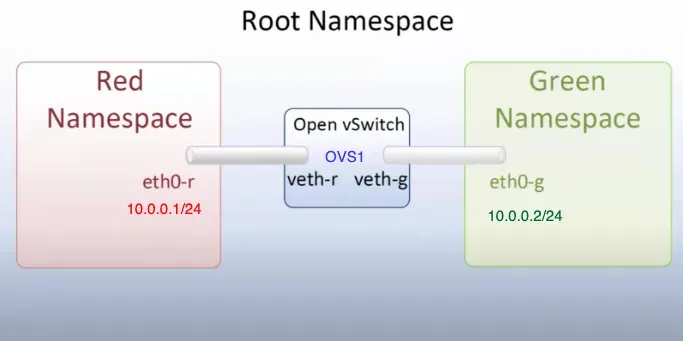
The same mechanism lets you build virtual networks between containers that talk to each other without being reachable from outside, which is what Docker does when you create a user-defined network.
Cgroups: how much that process gets to take
If namespaces decide what the process sees, cgroups decide how much it can consume. They are a filesystem interface under /sys/fs/cgroup/: each group is a directory, and the files inside it are the limits and the counters.
Five categories of resource:
- Memory — maximum amount and swap usage. The limit can be soft, in which case memory is reclaimed when needed, or hard, in which case exceeding it triggers the OOM Killer.
- CPU — exceeding the limit does not fail the process: it throttles it.
- Blkio — I/O operations, with throttling on excessive reads and writes.
- Network — limits on traffic.
- Device — which devices the process may write to.
The difference between a soft and a hard limit is not a configuration detail: it decides whether, under pressure, the application slows down or dies. You can see it by running a container against its own limit.
# 1. Create a container with a memory limit
docker run -it --memory=100m --name memory-demo ubuntu bash

# 2. Find the container's cgroup
CONTAINER_ID=$(docker inspect --format '{{.Id}}' memory-demo)
cat /sys/fs/cgroup/memory/docker/$CONTAINER_ID/memory.limit_in_bytes

# 3. Normal allocation test (from the container shell)
python3 -c "
data = []
for i in range(50):
    data.append(b'0' * (1024 * 1024))  # 1MB per iteration
    print(f'Allocated {i+1} MB')
"

# 4. Test that exceeds the limit (should fail)
python3 -c "
data = []
for i in range(150):
    data.append(b'0' * (1024 * 1024))  # tries to allocate 150MB
    print(f'Allocated {i+1} MB')
"
# the process will be terminated by the kernel OOM killer

# 5. Check the system logs
dmesg | tail -n 20 | grep -i "killed process"
Step 4 does not produce an application error: it produces a process killed by the kernel. Whoever reads the application logs finds nothing, because the application never got the chance to write. The trace is in dmesg, and it is why a container that “disappears without logs” is almost always a badly tuned memory limit.
The same files serve for observing rather than limiting:
# Container under controlled load
docker run -d --name stress-demo --memory=200m --cpus=0.5 ubuntu \
  bash -c "apt update && apt install -y stress && stress --cpu 2 --memory 1 --memory-bytes 150M"

docker stats stress-demo

# The same numbers, read straight from the cgroup
CONTAINER_ID=$(docker inspect --format '{{.Id}}' stress-demo)
watch -n 1 "cat /sys/fs/cgroup/memory/docker/$CONTAINER_ID/memory.usage_in_bytes"
cat /sys/fs/cgroup/cpu/docker/$CONTAINER_ID/cpu.stat
docker stats reads those files. Knowing they are files explains why container monitoring does not require an agent inside the container.
Where the isolation ends
Here is the consequence worth taking away, and it is the flip side of the opening claim.
A virtual machine has a kernel of its own: the hypervisor separates two complete operating systems. A container shares the host’s kernel. Namespaces and cgroups are features of that shared kernel — a limit imposed from the inside, not a wall between two systems.
Three consequences, and they are operational:
- A kernel vulnerability is a vulnerability of every container running on it. There is no second kernel acting as a safety net.
- Root on the host is root everywhere. The
nsenterfrom the previous section is not an exploit: it is a documented command. - In exchange, there is no operating system to boot, which is why a container starts in a second and a VM in a minute.
It is a trade-off, not a defect, but you should pick it knowing what you are picking. Containers for density and cycle speed; virtual machines when isolation has to hold against whatever runs next door — third-party code, tenants who do not trust each other, compliance requirements demanding physical separation.
Put in one sentence to carry out of the team: the container density that lets you run forty services on one server instead of forty VMs is the same choice that puts those forty services behind a single kernel, and the second half of that sentence is the one nobody usually says when presenting the infrastructure savings.
What to do tomorrow
Take a container running in production at your place and do the first three steps of the first demo: find the PID on the host, look at /proc/$PID/ns/, read /proc/$PID/status. Ten minutes, and the mental model shifts from “machine” to “process with a restricted view”.
Then look at your containers’ memory limits. If they are not set, the first one that leaks takes it all and the kernel decides on its own who to kill. If they are set too tight, you are the one killing them — and it shows up in dmesg, not in your logs.
What remains open
Some properties of these mechanisms worth keeping in mind.
- — In the PID namespace hierarchy processes stay visible to the levels above: isolation works inwards, not outwards
- — Without dedicated configuration a process inside a network namespace cannot reach the rest of the system: exposure goes through controlled port mapping
- — Hard memory limits lead to the OOM Killer: the threshold has to be tuned against the application's profile
- — Container or virtual machine depends on which trade-off you accept between efficiency and complete isolation
- — The cgroup paths in the demos assume cgroup v1: on a distribution defaulting to v2 the hierarchy under `/sys/fs/cgroup` is organised differently