Writing a login system from scratch is boring, but it gets done. Registration, password reset, credential hashing, session handling: a week, maybe two, and it works.
The bill arrives with the second application. Because the second one does not reuse the first: it rewrites the same tables, repeats the same doubts, and adds a second place where one person’s passwords are stored — possibly different from the first.
And the moment that bill becomes visible to everyone is a precise one: it is the day somebody leaves the company. Because at that point disabling them is not one operation, it is N operations across N systems, each of which can be forgotten. And the forgotten one makes no noise.
Why identity silos get paid later, not now
Three applications inside an organisation — an HR tool, a CRM, an email client — each managing its own credentials.
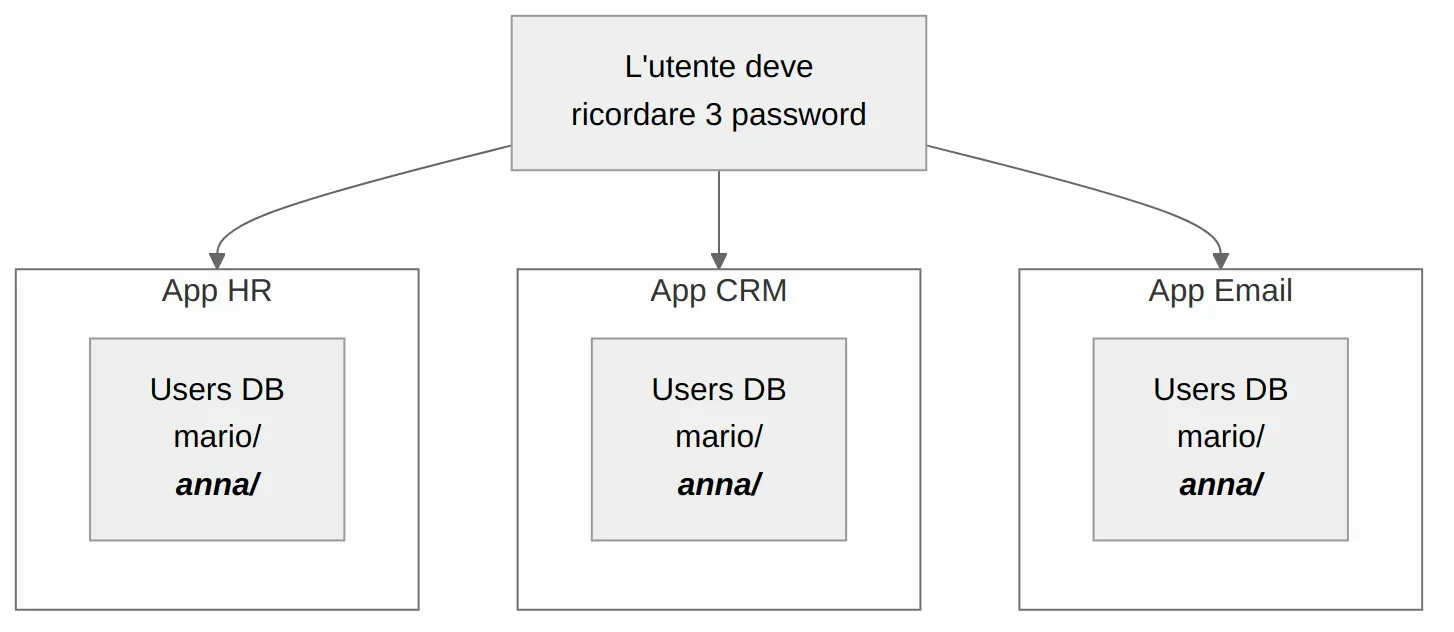
While there are three of them it looks manageable. The costs that grow are four others, and none of them shows up on day one:
- Passwords get duplicated. The user reuses the same one everywhere — and then one compromise opens all of them — or uses three different ones and forgets two, which becomes load for whoever runs support.
- There is no Single Sign-On. A separate login for every application, every time.
- Security diverges. MFA, lockout after N failed attempts, access auditing: every app implements them its own way, or does not. Nobody knows which one is worst off.
- Deactivation is N interventions. The one above.
And today’s architectures make the bill worse, not better. A single product can have an SPA, a REST API, five microservices and a mobile app: each of them needs to know who is calling. Rewriting authentication in each is not laborious, it is unsustainable.
If the code never touches passwords, it cannot mishandle them
The fix is to take authentication out of the applications and put it in a dedicated component — an Identity Provider. Apps stop handling credentials: they receive a signed token and verify its signature.
The point is not convenience. It is that the risk moves into a single place, and a single place can actually be guarded: you patch it when a fix ships, you configure MFA once, you look at one access log instead of four.
Two consequences follow, and they are the ones that count:
- The user logs in once and reaches everything. That is Single Sign-On.
- An employee leaves? You disable them in one place and they lose access everywhere.
The other side has to be said too: that single place is also a single point of failure. If the IdP does not answer, nobody authenticates anywhere. That is a risk you design for — replicas, token caching, tolerance for expiry — not one you ignore.
What you delegate to Keycloak, and what stays yours
Keycloak is an open-source Identity Provider born at Red Hat, Apache 2.0 licensed. It is not a library to integrate: it is a standalone service you run alongside your applications.

What stops being your code:
- Authorization server — it implements OAuth 2.0 and OpenID Connect. Apps delegate through open standards, not a protocol invented in-house.
- User federation — if an LDAP or Active Directory with thousands of users already exists, Keycloak connects to it and uses them. No migration.
- Social login — Google, GitHub and the rest are configured from the console, without writing anything.
- User management — registration, password reset, sessions, MFA.
What stays yours, and it needs saying because it is the part that surprises people: deciding what a user is allowed to do. Keycloak says who they are and carries the roles; it is your application that decides what those roles open. Where authentication ends and authorization begins is a line you draw by hand, and it is the subject of OPA as a policy engine.
Realm, client, role: the three concepts that shape the project
Before touching anything, three words. Three, because they are the three decisions that are expensive to change later.
- Realm — the isolated container: its own users, roles and configuration. One per project, or one per environment. Two realms cannot see each other, and that is exactly what makes them useful.
- Client — every application that connects. The React frontend is a client, the API behind it is another. This is not bureaucracy: it is what lets you say a token issued for one is not valid for the other.
- Role — the permissions that end up in the token and that the app will use to decide.
A concrete example: realm techstore, two clients shop-ui and shop-api, users Mario and Admin, and the admin role assigned only to the second. When Mario logs in, his token tells the application who he is and what he is allowed to do, without the application having to ask anyone.
Login, in three steps
The standard flow for a web application is called Authorization Code Flow, and from the user’s point of view it is three things:
- they click “Login” in the app and get redirected to Keycloak’s page
- they enter their credentials on Keycloak, not on the app
- they come back to the app with a JWT token carrying identity, roles and expiry
Keycloak signs that token with its private key; the app validates it by fetching the public key. If anyone modifies it, the signature no longer matches and the token is rejected.
Step 2 is the one people get wrong most often: the app must not have a login form of its own. If you collect username and password in your frontend, those credentials travel through your code again — and you are back where you started, with all the problems the IdP was supposed to remove. The redirect exists precisely to avoid that.
The complete flow, with PKCE and the client and middleware configuration, is the subject of the next article in the series.
The four day-one traps
- A login form in the app. The one above. It is the mistake that cancels the point of the whole exercise.
start-devin production. Convenient for trying it, unsuitable beyond that: it enables HTTP without TLS, uses a local H2 database and relaxes several security settings. Production needsstart, with PostgreSQL and HTTPS.- Ignoring roles. Keycloak has a complete role system. Reinventing authorization with custom logic in the backend means bringing back into the code exactly what you had just taken out.
- Hardcoded URLs. Keycloak’s address changes between local, staging and production. If it is not configurable from day one, the first deploy outside localhost greets you with an unexplained 401.
Try it in one minute
docker run -p 8080:8080 \
  -e KC_BOOTSTRAP_ADMIN_USERNAME=admin \
  -e KC_BOOTSTRAP_ADMIN_PASSWORD=admin \
  quay.io/keycloak/keycloak:26.0 start-dev
At http://localhost:8080, with admin/admin, you get the console. From there: a realm, a public client with the app’s redirect URI, a user. On the application side you need a client library — keycloak-js for the frontend, a JWT middleware for the backend — but the authentication logic stays over there.
What it is worth, said to someone who does not write code
The benefit is not “one less thing to write”, which is a developer’s argument. It is this: a person leaving the company goes from N interventions across N systems, each of them forgettable, to a single switch — and along with it, MFA and access auditing become one decision taken once instead of N implementations written by different people at different times.
Which translates into the question an engineering leadership should be able to answer: how long is it, today, between someone leaving and them no longer being able to get into anything? If answering requires opening a list of systems and ticking them off by hand, you do not know the number.
Where to start
Count the places where a users table exists across your projects. If there is more than one, you already have this article’s problem — you just have not paid for it yet.
Then run the command above and create a realm with two clients. Ten minutes is enough to tell whether the three concepts in the previous section fit your case, which is the only question that matters before adopting it.
What remains open
What an introductory overview deliberately leaves out
- — The login flow is described in its three high-level steps: the full client and protocol configuration stays outside this introduction
- — LDAP federation, social login and roles appear as available capabilities: none of them is configured here
- — The startup example pins version 26.0 of the Docker image: commands and admin console may vary in other releases
- — `start-dev` is for trying it only: HTTP without TLS and a local H2 database make it unsuitable beyond development
- — Centralizing identity moves the risk rather than removing it: the IdP becomes a single point of failure, and has to be designed accordingly