Enabling tracing on Keycloak means finding emails, usernames, and JWT tokens in plain text inside your spans. Keycloak manages credentials, tokens, and sessions — when tracing is active, all of this reaches your observability backend unfiltered. The risk: a data breach and a GDPR violation, one click away in Grafana Explore.
This article shows how to filter sensitive data directly in the OTel Collector, before it ever reaches Tempo. The strategy relies on four techniques — DELETE, REDACT, HASH, and SANITIZE — to maintain full observability without exposing PII.
Traces Record Everything, Including Sensitive Data
When you add observability to an authentication service like Keycloak, the first trace immediately reveals the risk: everything reaches the backend — logs, spans, metrics — with no distinction between operational data and sensitive data.
Typical scenario:
User → Frontend → Backend API → Keycloak (authentication)
                                    ↓
                                 Postgres (users, sessions)
Enabling Keycloak’s native tracing (available from version 26.0, initially as a preview, stabilized in later releases), instrumentation works immediately. But in Grafana you see this:
{
  "trace_id": "abc123...",
  "service.name": "keycloak",
  "http.method": "POST",
  "http.url": "/auth/realms/techstore/protocol/openid-connect/token?username=mario",
  "enduser.id": "mario",
  "db.statement": "SELECT * FROM user_entity WHERE username = 'mario'"
}
Native tracing does not capture HTTP request bodies, but sensitive data still ends up in traces via URL query parameters, database statements, and span attributes.
What’s wrong here:
- Username exposed in URL query parameters and database queries
- Session IDs and tokens traceable
- Potential GDPR violation (Art. 5: data minimization, Art. 32: security measures)
- Data breach risk if the Grafana/Tempo backend is compromised
Tracing instruments internal operations, but it does not distinguish what is sensitive from what is not. And not tracing Keycloak is not an option — you lose visibility into a critical component.
The solution? Filter sensitive data in the OTel Collector, before it reaches the backend.
Keycloak Instruments in 5 Lines of Config
Before diving into filtering, let’s look at how simple it is to instrument Keycloak — and why, without filters, the situation becomes problematic immediately.
From version 26, Keycloak supports OpenTelemetry natively, without the Java Agent.
The full code is in the MockMart repository:
git clone https://github.com/monte97/MockMart
cd MockMart
Full stack (simplified extract from docker-compose.keycloak-pii.yml):
The extract below is simplified for readability. The full compose file includes Postgres, application services (shop-api, shop-ui), healthchecks, volumes, and additional configuration. See the repository for the complete setup.
services:
  keycloak:
    image: quay.io/keycloak/keycloak:26.0
    command: start-dev
    ports:
      - "8080:8080"
    environment:
      KC_DB: postgres
      KC_DB_URL: jdbc:postgresql://keycloak-postgres:5432/keycloak
      KC_HTTP_RELATIVE_PATH: /auth
      KEYCLOAK_ADMIN: admin
      KEYCLOAK_ADMIN_PASSWORD: admin
      # OpenTelemetry — native tracing
      KC_TRACING_ENABLED: "true"
      KC_TRACING_ENDPOINT: http://otel-collector:4317
      KC_TRACING_SERVICE_NAME: keycloak
      KC_METRICS_ENABLED: "true"

  otel-collector:
    image: otel/opentelemetry-collector-contrib:0.120.0
    ports:
      - "4317:4317"   # OTLP gRPC
      - "4318:4318"   # OTLP HTTP
    volumes:
      - ./otel-config/keycloak-pii/${OTEL_CONFIG:-otel-collector-config.yaml}:/etc/otel-collector-config.yaml:ro

  grafana:
    image: grafana/grafana:11.4.0
    ports:
      - "3005:3000"
Configuration:
- Enable native tracing via environment:
KC_TRACING_ENABLED - Configure the OTel endpoint:
KC_TRACING_ENDPOINT - Enable metrics:
KC_METRICS_ENABLED
Environment variables are the recommended approach — avoid duplicating configuration with CLI flags in the command, because precedence between the two methods varies across Keycloak versions.
Note on Keycloak variables: Keycloak 26.0 uses
KC_TRACING_*variables for tracing. The unifiedKC_TELEMETRY_*variables (covering tracing, logs, and metrics) are available with theopentelemetry-logs,opentelemetry-metricsfeature flags in 26.0, or natively in later releases (26.1+). The full compose file in the repository usesKC_TRACING_*for compatibility with 26.0.
What is auto-instrumented:
- HTTP requests (incoming/outgoing)
- Database queries (JDBC — Postgres)
- Context propagation (W3C traceparent)
Zero code changes to Keycloak — configuration only.
Testing the problem:
docker compose -f docker-compose.keycloak-pii.yml up -d

# Login via password grant (deprecated in OAuth 2.1, for demo purposes only)
curl -X POST http://localhost/auth/realms/techstore/protocol/openid-connect/token \
  -H "Content-Type: application/x-www-form-urlencoded" \
  -d "grant_type=password" \
  -d "client_id=shop-ui" \
  -d "username=mario" \
  -d "password=mario123"
Expected output:
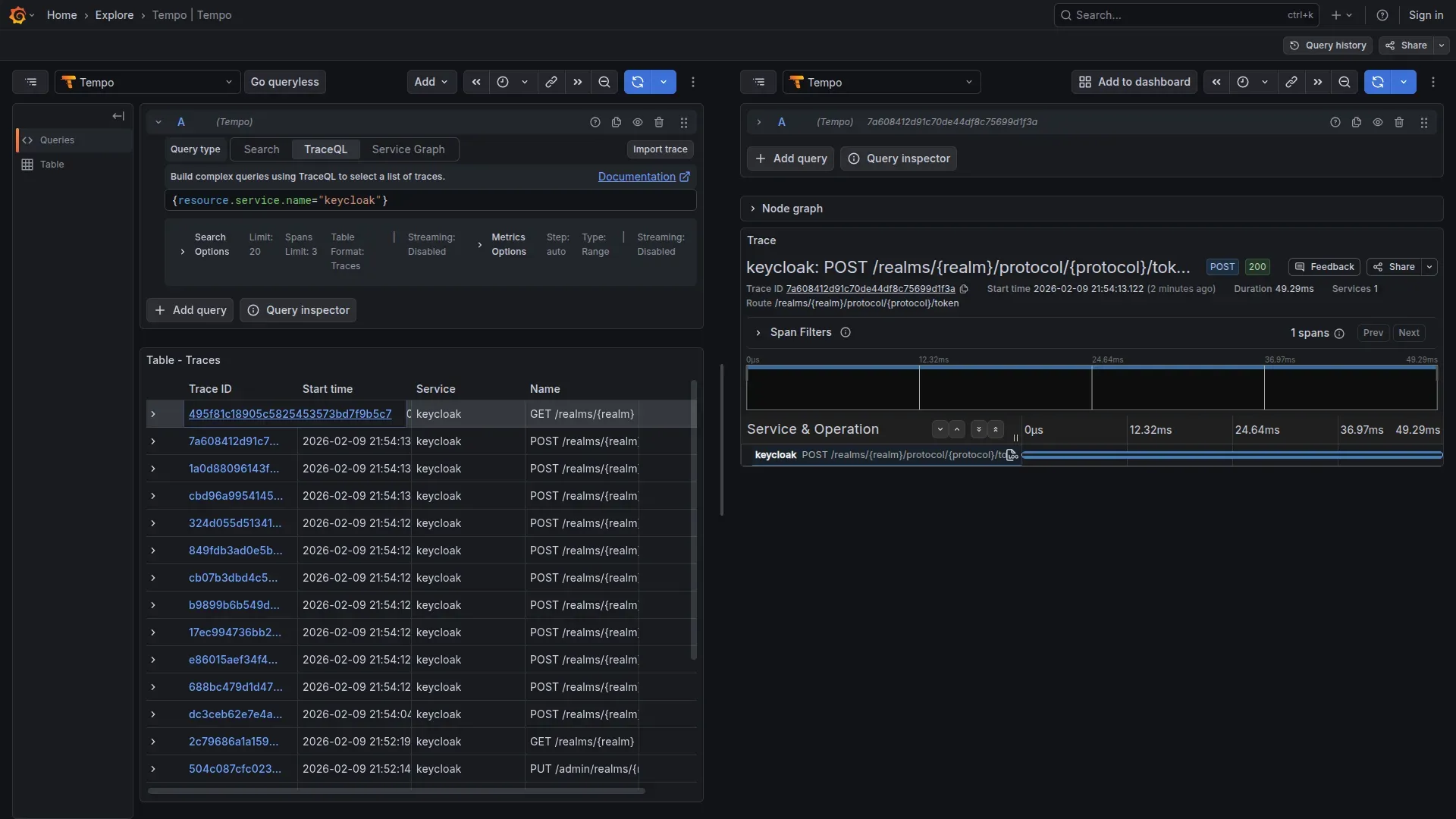
{"access_token":"eyJhbG...","token_type":"bearer","expires_in":300}In Grafana (http://localhost/grafana) → Explore → Tempo, with the query:
{service.name="keycloak"}
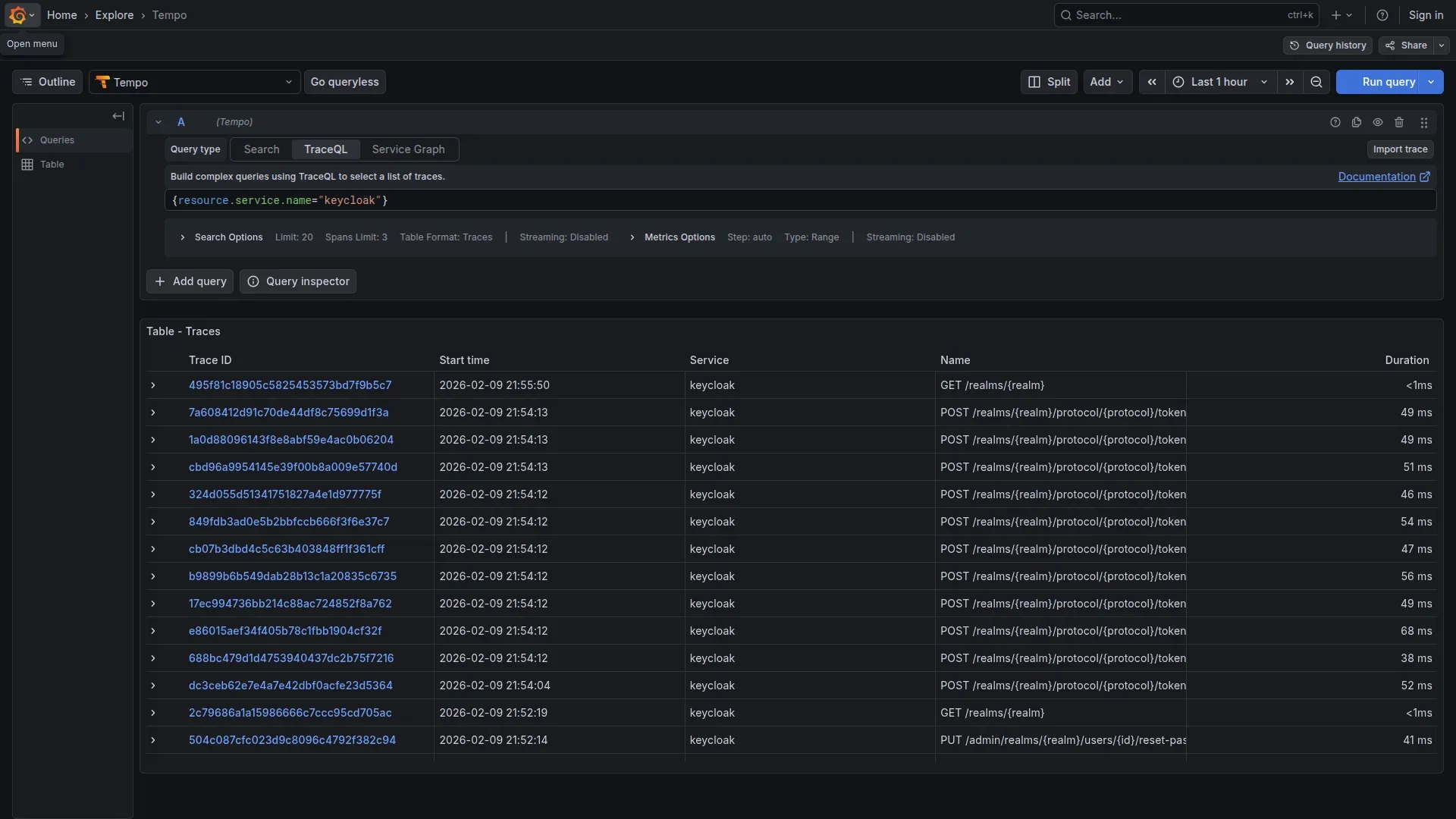
Result: The trace reveals the entire structure of the authentication database: queries on USER_ENTITY, CREDENTIAL, USER_ATTRIBUTE, all visible in the waterfall:
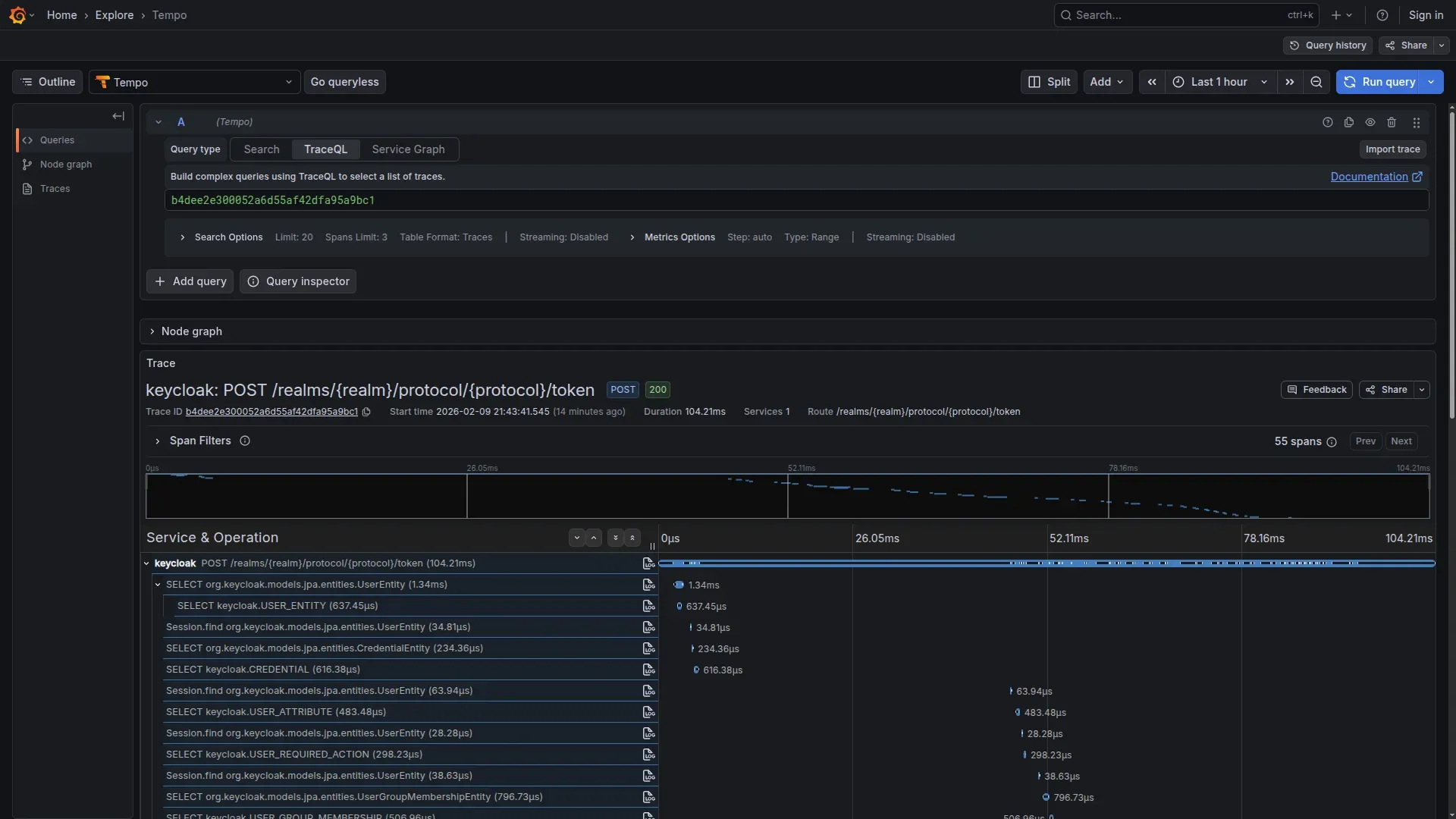
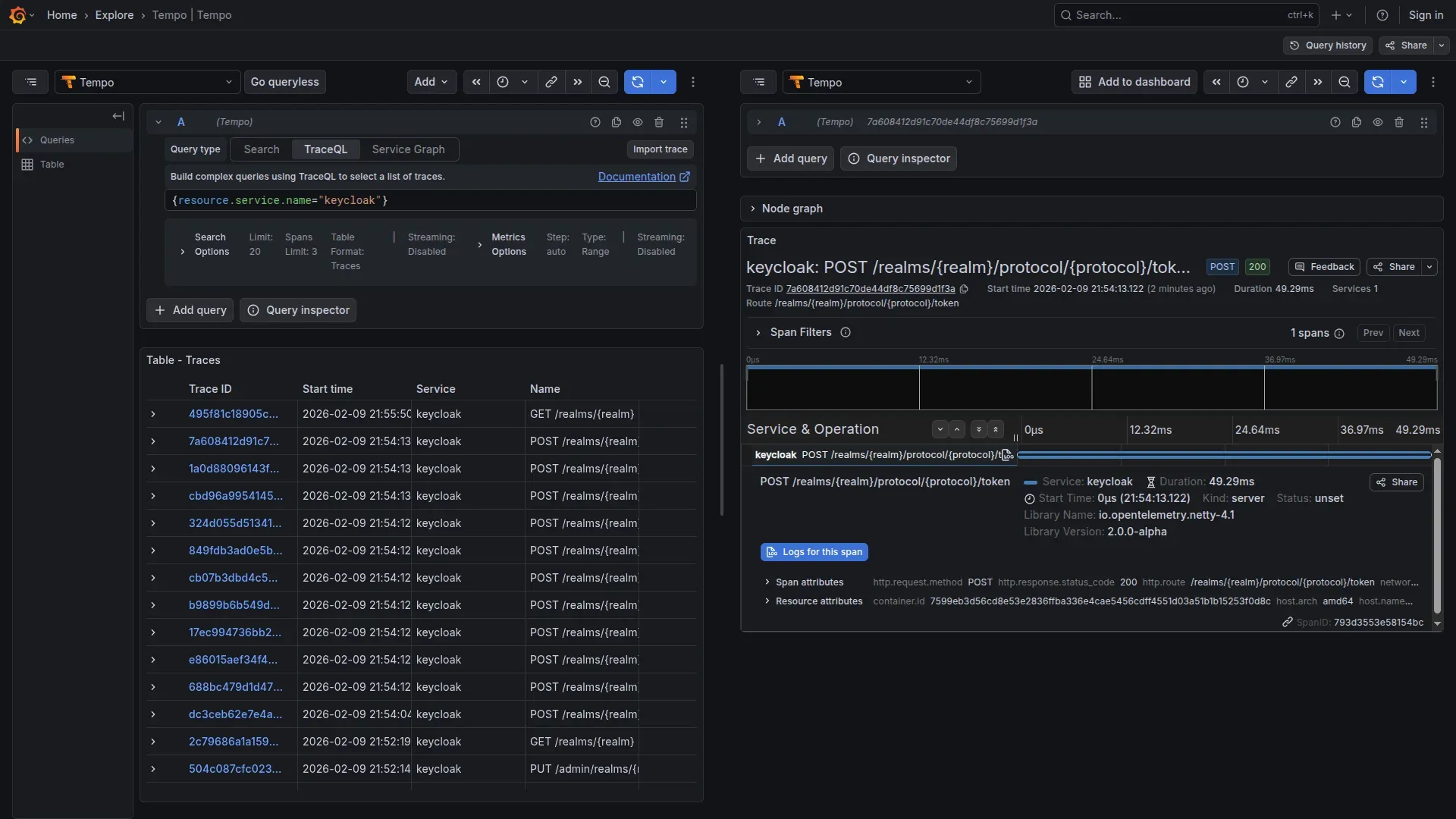
This is the problem we need to solve.
Filter Without Losing Visibility
Now that we have seen the problem, let’s build the solution. The OTel Collector provides four filtering techniques, each suited to a different type of sensitive data.
Each type of sensitive data requires a different technique
- DELETE: Remove entire attributes (e.g.
http.request.header.authorization) - REDACT: Delete attributes whose value matches a PII pattern (e.g. URLs with
username=...) - HASH: Anonymize but maintain correlation (e.g.
sha256:8f14e45f...) - SANITIZE: Delete queries/logs with embedded PII values
Our configuration: removing PII before storage
File: otel-config/keycloak-pii/otel-collector-config.yaml
The configuration is organized into separate processors, each with a specific responsibility.
Receivers and memory protection:
receivers:
  otlp:
    protocols:
      grpc:
        endpoint: 0.0.0.0:4317
      http:
        endpoint: 0.0.0.0:4318

processors:
  # MEMORY PROTECTION (always first)
  memory_limiter:
    check_interval: 1s
    limit_mib: 512
    spike_limit_mib: 128
1. DELETE — Remove entire sensitive attributes:
  attributes/delete-pii:
    actions:
      - key: http.request.header.authorization
        action: delete
      - key: http.request.header.cookie
        action: delete
      - key: http.response.header.set-cookie
        action: delete
      - key: auth.token
        action: delete
2. REDACT — Delete URLs containing sensitive parameters:
The transform processor with OTTL allows deleting an attribute based on its value, not just its key name:
  transform/redact-urls:
    error_mode: ignore
    trace_statements:
      - context: span
        statements:
          - delete_key(attributes, "http.url") where IsMatch(attributes["http.url"], ".*(username|email|password|token|client_secret).*")
          - delete_key(attributes, "url.full") where IsMatch(attributes["url.full"], ".*(username|email|password|token|client_secret).*")
          - delete_key(attributes, "url.query") where IsMatch(attributes["url.query"], ".*(username|email|password|client_secret).*")
The attributes processor supports pattern only for matching attribute key names, not values. To filter based on a value, use the transform processor with where clauses. Note: error_mode: ignore is the right choice in production, but use error_mode: propagate during development to surface regex errors.
3. HASH — User identifiers (SHA-256, maintain correlation):
  # CAVEAT: not full anonymization if input space is small
  attributes/hash-users:
    actions:
      - key: enduser.id
        action: hash
      - key: enduser.username
        action: hash
      - key: user.id
        action: hash
      - key: user.email
        action: hash
Warning: The Collector’s
hashaction uses SHA-256 without a salt. On low-entropy inputs (common usernames, emails), the hash is reversible with rainbow tables. This provides cross-span correlation, not true anonymization. For GDPR-compliant pseudonymization, consider HMAC-SHA256 with a separately managed secret key.
4. SANITIZE — Delete database queries containing PII values:
  transform/sanitize-db:
    error_mode: ignore
    trace_statements:
      - context: span
        statements:
          - delete_key(attributes, "db.statement") where IsMatch(attributes["db.statement"], ".*(email|username|password|user_id)\\s*=.*")
          # db.query.text is the new name (semantic conventions v1.28+)
          - delete_key(attributes, "db.query.text") where IsMatch(attributes["db.query.text"], ".*(email|username|password|user_id)\\s*=.*")
Batch, exporters, and pipeline:
  batch:
    timeout: 10s
    send_batch_size: 1024

exporters:
  otlp/tempo:
    endpoint: tempo:4317
    tls:
      insecure: true

  prometheusremotewrite:
    endpoint: http://prometheus:9090/api/v1/write
    tls:
      insecure: true

service:
  pipelines:
    traces:
      receivers: [otlp]
      processors: [
        memory_limiter,
        attributes/delete-pii,
        transform/redact-urls,
        attributes/hash-users,
        transform/sanitize-db,
        batch
      ]
      exporters: [otlp/tempo]

    metrics:
      receivers: [otlp]
      processors: [memory_limiter, batch]
      exporters: [prometheusremotewrite]
The configuration covers both old (http.url, http.target) and new (url.full, url.query) HTTP semantic convention names, and similarly both db.statement (old) and db.query.text (new, from semantic conventions v1.28+) for databases. Depending on the SDK version bundled with Keycloak, you may encounter either set.
What concretely changes in the traces
| Span Attribute | Before (UNSAFE) | After (SAFE) |
|---|---|---|
http.request.header.authorization | Bearer eyJhbGciOi... | DELETED |
http.url / url.full | /token?username=mario | DELETED (contains PII) |
enduser.id | mario | a8f14e45fceea167... (SHA-256 HASH) |
db.statement | SELECT ... WHERE username = 'mario' | DELETED (contains PII) |
auth.token | eyJhbGciOiJSUzI1NiIsInR5cCI6IkpXVCJ9... | DELETED |
Comparing before and after in one command
To switch between safe and unsafe configs, use the OTEL_CONFIG variable:
# UNSAFE config (shows the problem)
OTEL_CONFIG=otel-collector-unsafe.yaml \
  docker compose -f docker-compose.keycloak-pii.yml up -d

# SAFE config (with PII filtering)
docker compose -f docker-compose.keycloak-pii.yml down
OTEL_CONFIG=otel-collector-config.yaml \
  docker compose -f docker-compose.keycloak-pii.yml up -d

# Repeat login (password grant — demo only)
curl -X POST http://localhost/auth/realms/techstore/protocol/openid-connect/token \
  -d "grant_type=password" \
  -d "client_id=shop-ui" \
  -d "username=mario" \
  -d "password=mario123"
Verify in Grafana:
- No password visible
- No email in plaintext
- Database queries sanitized
- User IDs hashed
Cleanup:
docker compose -f docker-compose.keycloak-pii.yml down -vDebug capability remains intact
If you are wondering whether you lose diagnostic capability, the answer is no. After filtering you still have everything you need:
- Trace ID — End-to-end correlation
- Span timing — Performance analysis (how long did login take?)
- Service topology — Which services were called (Keycloak → Postgres)
- HTTP status codes — Success/failure (200, 401, 500)
- Error messages — Stack traces (without PII)
- Hashed user ID — Per-user analysis (deterministic hash, same user = same hash)
Data removed:
- Username/email in plaintext — removed
- Passwords — removed
- Token content — removed
- Session IDs — removed
- Values in database queries — removed
Trade-off: Hash Lookup
With enduser.id: a8f14e45fceea167... (SHA-256 hash) in the trace, to identify the user:
Option 1: On-demand hash
echo -n "mario" | sha256sum
# Match with trace!
Option 2: Separate lookup table (only the Security team has access)
An acceptable trade-off for GDPR compliance.
Metrics: do not forget labels
Beyond traces, Keycloak 26 exports metrics via OTLP (KC_METRICS_ENABLED). The native metrics are based on Micrometer/Quarkus: JVM, HTTP server, database connection pool.
The risk here is more subtle: if you use additional extensions or SPIs, some metric labels can contain user identifiers. The Collector can filter these too:
processors:
  transform/metrics-pii:
    error_mode: ignore
    metric_statements:
      - context: datapoint
        statements:
          - delete_key(attributes, "user_id")
          - delete_key(attributes, "username")
          - delete_key(attributes, "email")
Useful aggregate metrics for monitoring:
- JVM memory pressure and garbage collection
- HTTP request rate and latency
- Database connection pool saturation
- Active sessions (without user identifiers)
The Same Approach for Any Service Handling PII
Keycloak is just the concrete example we used, but the pattern works for any service that handles PII. If you need to instrument a payment gateway or a CRM, the reasoning is identical.
What to check before instrumenting
Before instrumenting:
1. What sensitive data does the service handle?
- User credentials (username, password, email)
- Authentication tokens (JWT, session IDs)
- Payment info (credit cards, billing)
- Personal identifiers (SSN, tax IDs)
- Location data (GPS, IP addresses)
2. Where can it end up in traces?
- HTTP request/response body
- URL query parameters
- HTTP headers (Authorization, Cookie)
- Database queries (WHERE, VALUES)
- Custom span attributes
3. Which filtering technique?
| Data Type | Condition | Technique | Rationale |
|---|---|---|---|
| Password/Secret | Always | DELETE | Never log |
| Token (JWT, API key) | Always | DELETE | Remove completely |
| User identifier | In URL/query param | REDACT (transform) | Delete if value matches |
| User identifier | As span attribute | HASH | Anonymized per-user analysis |
| Database query | With PII values | SANITIZE (transform) | Delete if contains PII |
| Credit Card | Always | DELETE | PCI-DSS compliance |
| Unclear | Always | DELETE (data minimization) | Principle of caution |
Three processors as a foundation
Pattern applicable to any service:
processors:
  # DELETE — Remove entire sensitive attributes
  attributes/<service-name>-delete:
    actions:
      - key: <sensitive-header-or-token>
        action: delete

  # REDACT — Delete attribute if value contains PII
  transform/<service-name>-redact:
    error_mode: ignore
    trace_statements:
      - context: span
        statements:
          - delete_key(attributes, "<field>") where IsMatch(attributes["<field>"], "<pii-pattern>")

  # HASH — Identifiers for anonymized correlation (SHA-256)
  attributes/<service-name>-hash:
    actions:
      - key: <user-identifier>
        action: hash
Quick examples:
- Payment (Stripe): DELETE card numbers, DELETE CVV
- CRM (Salesforce): HASH contact IDs, REDACT emails in queries
- Analytics (Mixpanel): HASH user traits, DELETE event properties with PII
The pattern adapts to each service’s specifics.
Filtering Alone Is Not Enough: GDPR Considerations
PII filtering solves the main problem, but if you operate under GDPR there are other aspects to cover. Here is a brief overview.
Retention and deletion
Configure a short retention on Tempo — 7 days is a good starting point:
# tempo.yaml (Tempo configuration, not OTel Collector)
compactor:
  compaction:
    block_retention: 168h  # 7 days — single global retention
Tempo supports only a single global retention (block_retention). If you need differentiated retention (audit vs. debug), your options are separate Tempo instances, Grafana Cloud with per-tenant retention, or upstream tail sampling.
For the right to erasure (Art. 17): Tempo does not support selective deletion of individual traces. In practice, combining PII filtering with short retention satisfies the requirement in most cases. If a user requests deletion, destroy the associated lookup table and wait for the retention period to expire.
Access control and data sovereignty
Limit who can view traces through Grafana datasource permissions (datasources:read, datasources:query, datasources:explore). Developers with Viewer role, Security team with Admin.
If the Tempo backend is located outside the EU, filtering alone is not sufficient for data residency. Options: self-hosted Tempo in an EU datacenter, Grafana Cloud EU (Frankfurt/Amsterdam), or S3 with a bucket in eu-central-1. For audit trails, Grafana Enterprise offers native audit logging; with OSS, use a reverse proxy with access logs.
Summary
We have seen how:
- Keycloak instruments in a few lines of container configuration — zero code changes
- Without filtering, traces expose everything — usernames, queries, tokens appear in plaintext in Grafana
- Four techniques in the OTel Collector (DELETE, REDACT, HASH, SANITIZE) solve the problem before data reaches the backend
- Debug capability remains intact — trace ID, timing, topology, and hashed user IDs are all you need to diagnose problems
- The pattern is reusable — the same approach works for payment gateways, CRMs, analytics services
| Aspect | Without Filtering | With Filtering |
|---|---|---|
| GDPR | Risk of PII exposure | Contributes to compliance |
| Data breach risk | High (PII exposed) | Reduced (PII removed) |
| Debug capability | Complete | Complete (via hashed IDs) |
| Audit readiness | Insufficient | Baseline met |
The takeaway is simple: if you trace services that handle sensitive data, the Collector is the right place to intervene. A couple of processors and your traces become safe without losing a single byte of operational information.
Next Steps
The full code, including both safe and unsafe configurations, is available in the repository:
To run the demo with a single command: make up-keycloak-pii (safe) or make up-keycloak-pii-unsafe (unsafe).
Next articles:
- Metrics Deep Dive — RED Method, custom metrics, cardinality control
- Multi-Tenancy Filtering — Per-tenant filtering strategies
- Keycloak Extensions — Custom event listeners for detailed audit
Resources:
- OTel Docs: opentelemetry.io/docs/collector
- GDPR Guide: gdpr.eu
- Full workshop: github.com/monte97/otel-workshop
Questions or feedback: francesco@montelli.dev | LinkedIn | GitHub